
If you’re creating content in 2025, the Veed.io video editor is one of those tools you’ll keep hearing about. This browser-based platform combines powerful AI with a super simple interface, so you can go from raw footage to polished, platform-ready content in minutes instead of hours. For busy YouTubers, coaches, agencies, and short-form creators, the Veed.io video editor often feels like an “edit assistant” working quietly in the background.
Instead of installing heavy software, you just open your browser, upload clips, and start editing inside the Veed.io video editor. That alone removes a huge barrier, especially if you move between devices or don’t have a powerful computer. On top of that, AI features like auto subtitles, AI video editing, noise removal, AI avatars, and translation handle all the repetitive, time-consuming parts of the process.
In this guide, you’ll see exactly what makes the Veed.io video editor advanced, why it’s so easy to use, and how its AI tools help creators get high-impact results. You’ll also get practical workflows, tips, and a clear FAQ section so you can decide whether the Veed.io video editor deserves a permanent place in your creator stack.
🎥 What Is the Veed.io Video Editor and How Is It Different?
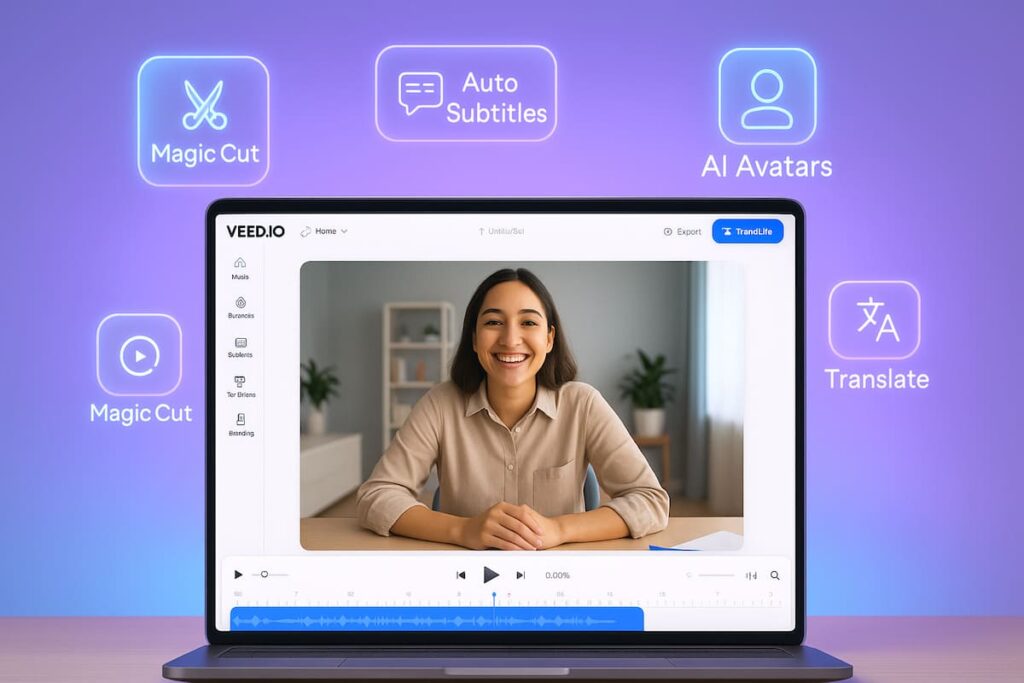
The Veed.io video editor is an online video editing platform built around AI-powered tools. Instead of staying limited to simple trimming, it gives you a full set of editing features plus smart automation: auto subtitles, AI cuts, AI translation, AI avatars, and even text-to-video options.
What makes the Veed.io video editor stand out is the combination of three things:
- 🌐 100% browser-based – No installs, no license juggling, just log in and edit.
- 🤖 AI-first features – Auto subtitle generation, AI video editor, AI translation, and more.
- 👥 Collaboration built in – Share links, collect feedback, and work with your team in the same project.
Traditional editors focus on manual control and offline workflows. The Veed.io video editor focuses on speed, automation, and cloud flexibility, which matches the way modern creators work: constantly filming, repurposing, and publishing across multiple platforms.
🤖 AI at the Core: How the Veed.io Video Editor Uses Artificial Intelligence
AI is not just a side feature inside the Veed.io video editor; it’s part of the core experience. Instead of making you do everything by hand, the platform uses artificial intelligence to handle the boring tasks, so you can focus on scripting, storytelling, and branding.
Here are some of the most useful AI tools inside the Veed.io video editor:
- 🧠 AI video editor (auto edits)
- Removes silences and filler words using tools like Magic Cut.
- Automatically cleans audio and improves flow.
- Helps you turn raw footage into a polished edit with just a few clicks.
- 📝 AI subtitles and transcription
- Generates subtitles with high accuracy using speech recognition.
- Lets you edit the captions visually and change fonts, colors, and styles.
- Exports subtitle files (SRT, VTT, etc.) if you want to upload them to YouTube or other platforms.
- 🌍 AI translation and dubbing
- Transcribes your audio and then translates it into over 100 languages.
- Lets you add translated subtitles directly on the video.
- Helps you turn one video into content for multiple regions with minimal effort.
- 🧑💻 AI avatars and AI voices
- Creates talking-head style videos using AI avatars, no camera needed.
- Combines with AI voice and voice cloning to match your brand or persona.
- Makes it easier to produce training, explainer, or product videos at scale.
- 🧹 AI cleanup tools
- Removes background noise from audio and video.
- Fixes eye contact so it looks like you’re looking straight at the viewer.
- Enhances your footage automatically so you don’t need deep technical skills.
Instead of doing these tasks manually, you offload them to the Veed.io video editor AI. Instead of worrying about tiny edits, you spend more time on hooks, thumbnails, and strategy. Instead of getting stuck on “busywork,” you get back to creating.
🌟 Why Creators Love the Veed.io Video Editor for AI-Powered Workflows
Creators care about two things: quality and speed. The Veed.io video editor helps on both sides by giving you advanced AI tools while still staying easy to use.
Here’s why so many creators lean toward the Veed.io video editor:
- ✅ It saves time with auto edits and AI tools
- Magic Cut removes pauses and filler words automatically.
- Auto subtitles and translations remove hours of manual caption work.
- ✅ It keeps the workflow simple
- A clean timeline and drag-and-drop editing make it beginner-friendly.
- Most AI tools are triggered by obvious buttons instead of complex menus.
- ✅ It’s built for modern content formats
- Resize for TikTok, Reels, Shorts, and horizontal YouTube videos easily.
- Shareable links and hosted players help with publishing and embedding.
Because the Veed.io video editor handles so much of the repetitive workload, you can batch-content more easily, repurpose long-form videos into short clips, and maintain a consistent publishing schedule. Moreover, that extra capacity can lead directly to growth if you use it to create more experiments, more formats, and more assets.
🧰 Key AI Features of the Veed.io Video Editor (Explained Simply)
Instead of listing every single feature, let’s focus on the AI-powered tools inside the Veed.io video editor that actually change your day-to-day editing experience.
✂️ AI Video Editor & Magic Cut
The AI video editor tool automatically removes silences, filler words like “um” and “uh,” and long pauses from your recording.
With the Veed.io video editor, you can:
- Upload a long talking-head or tutorial video.
- Click a single AI button like Magic Cut.
- Watch the platform generate a cleaner, tighter version.
This kind of automation is ideal for podcasters, educators, and creators who record long sessions and want fast, clean edits.
📝 AI Subtitles, Transcription, and Translation
The auto subtitle generator inside the Veed.io video editor is one of its most-loved AI tools. It listens to your audio, turns it into text, and syncs that text with your video as captions.
Using this AI feature, you can:
- Make your content watchable without sound on social feeds.
- Improve accessibility for deaf or hard-of-hearing viewers.
- Export transcripts for blogs, show notes, or social posts.
Additionally, AI translation lets you convert subtitles into other languages in just a few clicks, which greatly expands your potential audience.
🧑🎤 AI Avatars and AI Voices
Sometimes you don’t want to be on camera, or you need scalable content. The Veed.io video editor offers AI avatars and AI voice features so you can turn scripts into talking videos without recording yourself.
This is especially useful for:
- Training videos
- Product explainers
- Social ads
- Faceless channels
Combined with text-to-video, the Veed.io video editor becomes a complete AI studio: you provide the ideas and script, and the AI fills in visuals, avatars, and audio.
🚀 Simple AI-Driven Workflow with the Veed.io Video Editor
To get the best out of the Veed.io video editor, it helps to follow a clear workflow that leans into its AI power.
Here’s a practical step-by-step approach:
- Draft your script or outline 🧾
- Plan your hook, main points, and call-to-action.
- Decide whether you’ll record yourself or use AI avatars in the Veed.io video editor.
- Record or generate your base video 🎥
- Record with your camera, screen recorder, or the built-in recorder.
- Or create a video using AI avatars and text-to-video tools.
- Run AI edits inside the Veed.io video editor ⚙️
- Use Magic Cut to remove silences and filler words.
- Clean up audio and fix eye contact automatically if needed.
- Add AI subtitles and translations 📝
- Generate subtitles with one click.
- Translate them into additional languages to reach a global audience.
- Polish the visuals 🎨
- Add text overlays, graphics, and B-roll (even using AI B-roll tools where available).
- Resize for vertical or horizontal formats, depending on platform.
- Export, publish, and repurpose 📤
- Export high-quality versions for YouTube, TikTok, Reels, and more.
- Cut shorter highlight clips inside the Veed.io video editor using AI-powered tools to generate multiple variations.
By repeating this workflow, you build a predictable, AI-boosted system that turns ideas into content quickly and consistently.
✅ Pros and Cons of the Veed.io Video Editor as an AI Tool
To make a realistic decision, it’s helpful to look at both the strengths and limitations of the Veed.io video editor.
👍 Pros
- 🤖 Strong AI toolset – Auto edits, subtitles, translations, avatars, and AI voices in one place.
- 🌐 Fully online – Works on most modern devices and removes install headaches.
- 😀 Beginner-friendly – Clean interface and visual timeline make it ideal for non-technical creators.
- 👥 Great for teams – Cloud collaboration, review links, and shared workspaces.
👎 Cons
- 📶 Needs a stable internet connection – Heavy projects can feel slow on weak networks.
- 💳 Advanced AI features are on paid tiers – Free plans are better suited for testing than full-time editing.
- 🎚️ Not a complete replacement for high-end pro suites – Power users may still prefer desktop tools for complex color grading or VFX.
For most creators focused on social, educational, and marketing content, the Veed.io video editor hits a very sweet spot between power, simplicity, and AI automation.
🎯 Tips to Get the Most from the Veed.io Video Editor’s AI
To make the Veed.io video editor truly “advanced, easy, high-impact,” a few habits go a long way:
- 📚 Use AI for rough work, you for final decisions
- Let AI do the cuts, subtitles, and translations.
- Review everything once manually to maintain your voice and accuracy.
- 🔁 Build templates inside the Veed.io video editor
- Reuse fonts, colors, overlays, and layouts.
- Turn each new project into a small variation instead of a full rebuild.
- 🌍 Think multi-platform from the start
- Film in a way that works for both wide and vertical formats.
- Use AI to quickly generate short clips for additional platforms.
- 🧪 Experiment with AI avatars and text-to-video
- Try faceless content, training modules, or quick explainers.
- Use these to supplement, not replace, your on-camera presence.
Small improvements here compound over time. When you combine consistent templates, AI-powered speed, and your unique style, the Veed.io video editor becomes a serious accelerator for your content.
❓ FAQ: Veed.io Video Editor as an AI Tool for Creators
1. Is the Veed.io video editor really good for beginners?
Yes, the Veed.io video editor is designed to be beginner-friendly. The interface is clean and intuitive, and most AI features are activated with simple buttons instead of complicated timelines or nested menus. New creators can start with basic cuts and auto subtitles, then slowly explore more advanced AI options over time.
2. Can I use the Veed.io video editor only for AI tasks and finish in another editor?
You can absolutely treat the Veed.io video editor as an AI assistant in your workflow. Many creators use it for tasks like auto subtitles, translations, or quick AI cuts, then export the result and continue refining inside a desktop editor like Premiere Pro or DaVinci Resolve. That way you get the speed of AI plus the deep control of pro tools.
3. Does the Veed.io video editor support AI subtitles and translations for multiple languages?
Yes, the Veed.io video editor can automatically transcribe your audio and translate it into over 100 languages. You can then burn those subtitles into the video or export them as separate files, which is perfect for YouTube, international audiences, and global brands.
4. Are AI avatars inside the Veed.io video editor useful for real creators?
AI avatars are especially useful for educational content, internal training, product explainers, or faceless channels. You can turn scripts into talking videos without filming yourself, which saves time and removes camera anxiety. For creators who want to scale output while staying on-brand, this feature inside the Veed.io video editor can be a big advantage.
5. Is the Veed.io video editor worth paying for if I already have another editor?
If you already use a desktop editor but want faster AI-powered tasks—subtitles, translations, auto edits, and AI-based repurposing—the Veed.io video editor can still be worth it as a companion tool. It shines in speed, collaboration, and automation. When you pair it with your existing editor, you get the best of both worlds: AI acceleration plus deep manual control.