
Nano Banana Pro sounds like a joke name, but the results can feel very serious. When we tried Nano Banana Pro for real-world image work, the first thing we noticed was control. The second thing we noticed was text. The third thing we noticed was how quickly you can go from idea to a polished visual.
Most people don’t need “another AI image tool.” They need a tool that helps them make usable images for school, work, ads, thumbnails, posters, and social posts. Nano Banana Pro aims to do that with better precision than basic image generators.
This post explains Nano Banana Pro in simple language. It also shares what you should test, what usually goes well, and what can still feel annoying. Plus, you’ll get a comparison table and a clear FAQ so you can decide faster.
What Is Nano Banana Pro? 🧠🖼️
Nano Banana Pro is an advanced AI image generator and photo editor. You type what you want, and it creates an image. You can also upload a photo and ask for edits. Compared to casual tools, Nano Banana Pro focuses more on accuracy, clean output, and stronger control.
Nano Banana Pro is often used for:
- Posters with readable text 🪧
- Product-style images for ads 🛍️
- Social media designs and thumbnails 🎬
- Character consistency for series content 👤
- Precise edits like lighting, angle, and layout 🎛️
It’s built for people who want “almost finished” results, not just pretty pictures.
Why Nano Banana Pro Feels Different (Fast Explanation) ⚡
Many image models can generate something nice-looking. Nano Banana Pro tries to generate something usable.
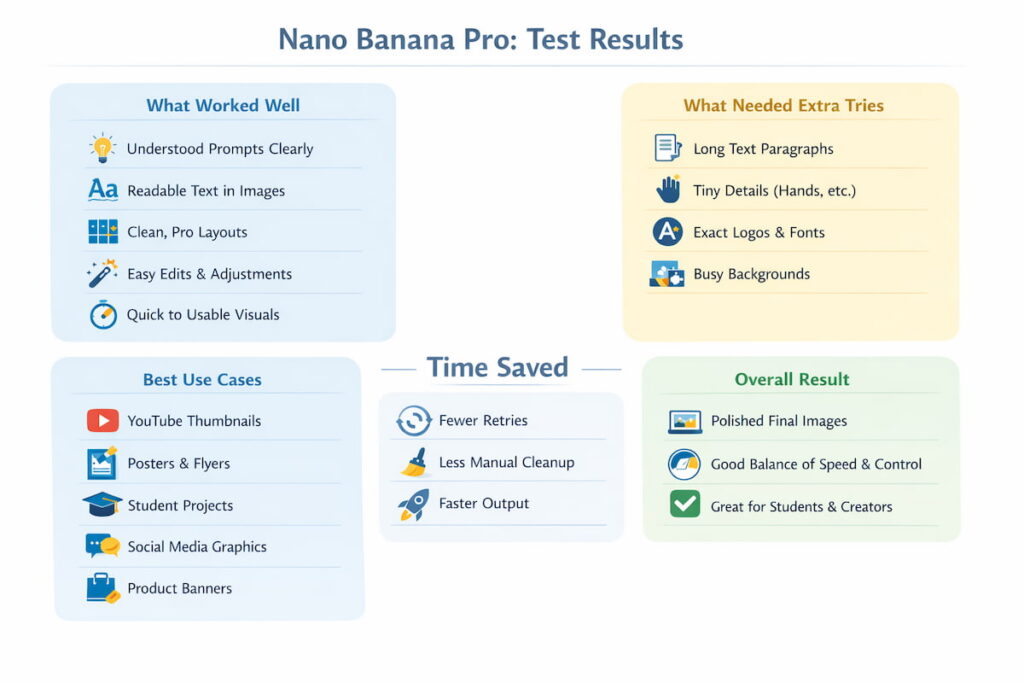
Here’s what stood out in our Nano Banana Pro testing approach:
- It tends to follow instructions more closely
- It often keeps details consistent across edits
- It’s usually better at clean, sharp text
- It pushes you toward professional-looking layouts
That doesn’t mean it’s perfect. However, it can reduce the number of retries you do.
Our Simple Test Plan for Nano Banana Pro ✅
To keep things fair, we used a basic checklist that anyone can copy. We tested Nano Banana Pro on common tasks that real creators do daily. We also kept prompts short and clear to see how well it understands normal people.
The test prompts we used (you can copy) 📝
- “Create a YouTube thumbnail for a study video, clean text, high contrast, 16:9”
- “Make a poster for a school science fair with readable title text”
- “Edit this photo: remove background clutter, keep face sharp”
- “Create a product banner, include a short slogan, keep text clear”
- “Change the lighting to warm golden hour, keep everything else the same”
- “Make a 1:1 Instagram post with a simple call to action”
This test set shows whether Nano Banana Pro is good for real output, not just art.
What Happened When We Tested Nano Banana Pro 🎯
1) Prompt Understanding Was Strong 🧩
Nano Banana Pro usually understood the main goal quickly. When the prompt was clear, the layout often matched what we asked for. That saved time because we didn’t need to “fight” the tool.
Still, vague prompts created vague results. So the tool rewards clarity.
Quick tip: Add the format you want (poster, thumbnail, banner) and the aspect ratio.
2) Text Rendering Was the Big “Wow” 😮
Text inside AI images is normally messy. Letters break. Words look fake. Spacing gets weird.
Nano Banana Pro handled text better than what many people expect:
- Titles were more readable
- Short phrases stayed cleaner
- Poster-style layouts looked more real
Long paragraphs can still fail. Tiny text can still blur. But for headlines and short slogans, Nano Banana Pro was noticeably stronger.
Best use: 3–8 words of text, big size, clear style.
3) Editing Felt More Precise ✂️📸
We tried simple edits and “local edits” (changing only one part of an image). Nano Banana Pro often kept the rest of the image stable while editing the target area.
Edits that worked well:
- Removing an object in the background
- Changing lighting and mood
- Adjusting camera angle feel
- Resizing to social formats
Edits that sometimes needed extra tries:
- Complex hand details
- Busy backgrounds with lots of small objects
- Very specific brand logos or exact fonts
Even so, Nano Banana Pro felt less random than many tools during edits.
4) Output Quality Looked More “Finished” 🏁
Nano Banana Pro often created images that looked closer to final design. Clean edges. Better lighting. More balanced composition.
A big reason is this: Nano Banana Pro seems to aim for “commercial-ready” visuals. That matters if you build thumbnails, posters, or ads.
5) Consistency Improved When We Used Reference Images 👥
When we used a reference photo (or kept the same subject), Nano Banana Pro often held the look better across variations. That helped when we wanted:
- the same character in different scenes
- the same product in different backgrounds
- a consistent style for a series
Consistency is never 100%. Yet Nano Banana Pro felt more reliable when we gave it clear anchors like “keep the same face, same outfit, same style.”
What Nano Banana Pro Does Best (Use Cases) 🌟
If you want quick wins, use Nano Banana Pro for:
- YouTube thumbnails (clean headline + strong subject) 🎬
- Posters and flyers (big readable text + simple layout) 🪧
- Instagram carousels (consistent theme + quick variations) 📲
- Product ads (clean lighting + neat composition) 🛍️
- School projects (diagrams, covers, title pages) 🎓
- Before/after edits (small clean improvements) ✨
Nano Banana Pro is especially helpful when you need output that looks organized, not just artistic.
Where Nano Banana Pro Can Still Struggle 😅
Every AI image model has weak spots. Nano Banana Pro is no exception.
Common problems you might see:
- Text is good, but not perfect for long lines
- Hands and tiny details can still look odd
- Very exact brand design work may need real design tools
- Some prompts may require 2–3 tries for the best result
That’s normal. The goal is fewer retries, not zero retries.
How to Get Better Results With Nano Banana Pro (Simple Tips) 🎛️
Use these rules and you’ll save time:
Prompt formula that works
Goal + format + style + subject + text rules + aspect ratio
Example:
- “Study thumbnail, clean modern style, student at laptop, big readable title ‘Study Smarter’, 16:9”
Extra tips (quick wins)
- Keep text short (headline length)
- Ask for “high contrast” for thumbnails
- Mention “minimal background” for clean posters
- Add “no extra words” if it adds unwanted text
- Specify aspect ratio: 1:1, 4:5, 9:16, 16:9
Nano Banana Pro rewards clear instructions more than long emotional prompts.
Nano Banana Pro vs Others: Comparison Table 📊
Here’s a simple table for decision-making. It’s not about “best overall.” It’s about “best for your task.”
| Feature | Nano Banana Pro | Basic Image Generators | Chat-style Image Tools | Pro Design Apps (with AI) |
|---|---|---|---|---|
| Best for | Precise, polished visuals | Quick fun images | Fast casual creation | Full control + brand work |
| Text in images | Often strong for headlines | Often weak | Mixed | Best when you set text manually |
| Editing control | High | Low to medium | Medium | Highest |
| Speed to usable output | Fast | Fast | Fast | Slower, but more control |
| Learning curve | Easy to medium | Easy | Easy | Medium to high |
| Best for students | Yes (projects, posters) | Yes (simple use) | Yes (quick ideas) | Yes (design courses) |
| Best for creators | Strong | Okay | Strong for drafts | Strong for final brand assets |
If your priority is clean posters, readable text, and tighter control, Nano Banana Pro often fits well.
Nano Banana Pro: Pricing and “Value” Mindset 💡💳
Prices and plans can change, so the smartest approach is value-based.
Ask yourself:
- How many images do I make per week?
- Do I need text-heavy posters and thumbnails?
- Do I need editing, not just generation?
- Will this save me time compared to switching tools?
Nano Banana Pro makes the most sense when you create visuals regularly, not once a month.
Who Should Use Nano Banana Pro? 🎯
Nano Banana Pro is a strong match if you are:
- a student making posters, diagrams, and presentations 🎓
- a YouTuber making thumbnails and channel art 🎬
- a marketer making ads and promo banners 📣
- a creator building a consistent visual series 📸
- a small business doing quick design work 🛍️
Nano Banana Pro might not be your first choice if you need:
- exact brand typography
- pixel-perfect layouts every time
- complex multi-layer editing like a full design suite
In that case, you can still use Nano Banana Pro to generate the base, then finish in a design app.
A Simple Workflow That Works With Nano Banana Pro 🔁✅
Here’s a clean workflow that keeps results consistent:
- Step 1: Generate 3 variations
- Step 2: Pick the best composition
- Step 3: Ask Nano Banana Pro for one targeted edit (lighting, background, text cleanup)
- Step 4: Export and add final text manually if needed
- Step 5: Save your best prompt as a template
This way, Nano Banana Pro does the heavy lift and you keep control.
FAQ: Nano Banana Pro ❓🍌
1) What is Nano Banana Pro used for?
Nano Banana Pro is used for generating images and editing photos with more precision than casual tools. People often use Nano Banana Pro for thumbnails, posters, ads, and social designs because the results can look more polished and text is often clearer.
2) Is Nano Banana Pro good for students?
Yes, Nano Banana Pro can be very useful for students. It can help create clean project visuals, posters, title pages, and diagrams. It also saves time when you need something presentable fast. Still, students should follow school rules about AI use.
3) Does Nano Banana Pro really write readable text in images?
Nano Banana Pro is often better at headlines and short phrases than many basic image models. For long text blocks, you may still need to add text in a design app. A simple rule helps: keep text short and bold-looking.
4) Can Nano Banana Pro edit a photo I upload?
Yes, Nano Banana Pro can handle photo edits like removing objects, changing lighting, adjusting backgrounds, and making targeted changes. For best results, use clear instructions and ask for one edit at a time.
5) What should I write in prompts for the best results?
Mention the format (poster, thumbnail), the style (clean, minimal, modern), the subject, and the aspect ratio. Add simple text rules like “no extra words” or “big readable title.” Nano Banana Pro works best when prompts are clear and not messy.
6) Is Nano Banana Pro better than basic image generators?
For precise control and cleaner, more usable output, Nano Banana Pro often feels stronger. Basic tools can be great for fun or fast images, but Nano Banana Pro is usually the better pick for professional-looking visuals.
7) What are the main limits of Nano Banana Pro?
Like most AI image tools, Nano Banana Pro can still struggle with tiny details, complex hands, and long text paragraphs. Sometimes it needs extra attempts for perfect results. Using reference images and clear prompts can reduce problems.