
Google Gemini Free vs Gemini Advanced is mainly about power, limits, and premium features. The free version is great for casual use. The paid version is built for people who use AI daily and want stronger results, longer chats, and extra tools. Still, not every user needs the upgrade. Many users are fine on free.
This guide breaks down Google Gemini Free vs Gemini Advanced in simple words. You will learn what changes when you upgrade, what you actually get, and how to decide fast. You will also get a comparison table, real use cases, and a FAQ section.
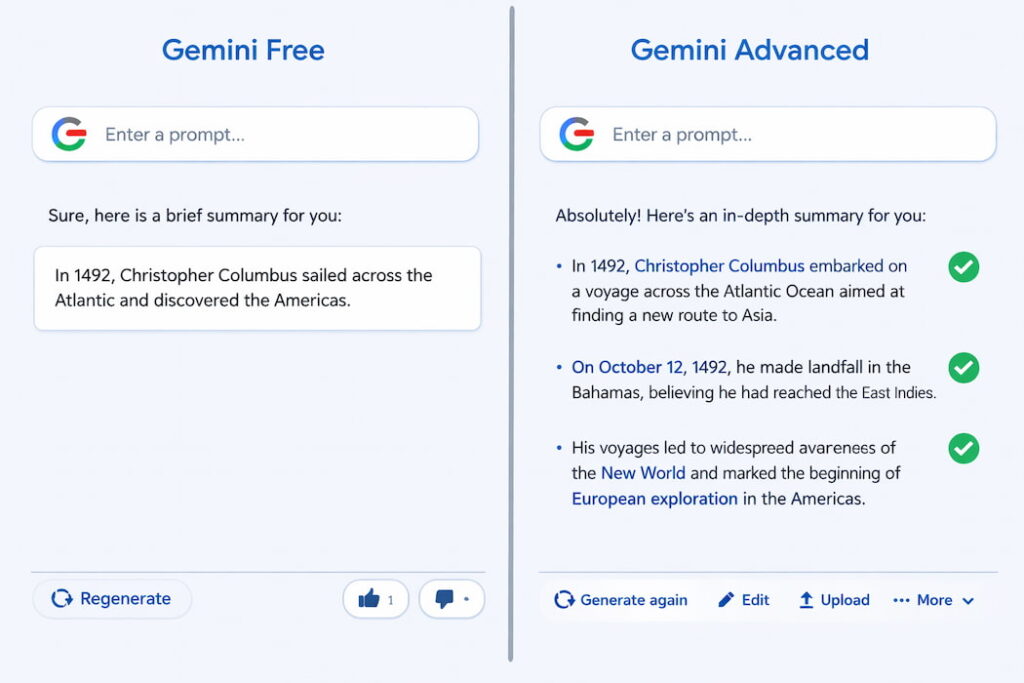
Quick definition: what is the difference? ✅
Google Gemini Free vs Gemini Advanced can be explained in one sentence:
- Free is for basic AI help with lower limits.
- Advanced is for heavier work with higher limits and premium features.
That’s the big picture. Now let’s get into the details that really affect your daily use.
What you can do with Gemini Free 🆓
Gemini Free is designed for everyday tasks. It works well when your requests are simple and your workload is light.
Common things Gemini Free handles well:
- ✍️ rewriting sentences and fixing grammar
- 📝 making short summaries
- 💡 brainstorming ideas and headlines
- 📚 explaining concepts in simple language
- ✅ creating quick checklists and plans
- 💬 helping with casual Q&A
Gemini Free is perfect if you use it a few times a day, or a few times a week. It is also great if you are still learning how to write good prompts.
What you can do with Gemini Advanced 💎
Gemini Advanced is meant for deeper work. It is often the choice for creators, students, and professionals who push AI harder.
Common reasons people upgrade:
- 🧠 better reasoning on complex tasks
- 📄 longer outputs without cutting off
- 🔁 higher usage limits (more prompts, more heavy work)
- 📊 stronger help with long documents, planning, or analysis
- ⚡ premium features that can save time in real workflows
If you use AI like a daily tool, Google Gemini Free vs Gemini Advanced becomes a serious comparison. Advanced can feel smoother because you hit fewer walls.
Comparison table: Google Gemini Free vs Gemini Advanced 📊
Here’s a simple side-by-side view. (Exact features can vary by region and plan, but the practical differences below are what most users notice.)
| Feature | Gemini Free | Gemini Advanced |
|---|---|---|
| Cost | Free | Paid subscription |
| Best for | Casual use | Daily heavy use |
| Model power | Standard | Premium / more capable model access |
| Message limits | Lower | Higher |
| Long tasks | Can struggle | Handles better |
| Long outputs | Shorter | Longer and more detailed |
| Complex reasoning | Basic to medium | Stronger for hard tasks |
| Productivity workflows | Limited | More advanced features and tools |
| Who should use | Students, casual users | Creators, power users, professionals |
This table is the core of Google Gemini Free vs Gemini Advanced. Now let’s explain what it means in real life.
What changes when you upgrade? (real-world differences) 🔥
1) You get stronger answers on hard prompts 🧠
When your question is simple, both versions can feel similar. However, the gap shows when the request is complex.
Examples where Advanced tends to help more:
- multi-step planning (content strategy, study schedule, business plan)
- comparing options with trade-offs (budget, time, risk)
- writing long structured content (guides, scripts, SOPs)
- breaking down technical topics in a clean order
This is where Google Gemini Free vs Gemini Advanced feels most different.
2) You hit limits less often ⏱️
Free tools often have daily or hourly limits. When you cross them, you slow down. Advanced usually gives higher limits, which matters if you use Gemini for work or long study sessions.
You feel this most when you:
- ask many follow-up questions
- rewrite content multiple times
- generate many variations (hooks, titles, ad copy)
- do long sessions for exam prep or research
If you hate interruptions, Google Gemini Free vs Gemini Advanced is largely a “limits” decision.
3) Long writing becomes easier ✍️
Long writing needs consistency. You want the same tone, the same structure, and fewer mistakes. Advanced usually does better when you ask for longer, cleaner content.
You can do things like:
- write a full blog post, then refine each section
- generate 10 hooks, pick 3, then polish
- create a script, then cut it down for Shorts
- build a full email sequence with the same voice
Free can do some of this. Still, Advanced tends to stay stable over long outputs.
4) Deep work feels smoother (less “restart” pain) 🔁
A big pain with free AI is restarting. You hit a limit, the output cuts off, or it loses the thread. Advanced usually reduces that friction.
This is important if you:
- build content in a multi-step workflow
- do long “back and forth” editing
- need the AI to remember context within the same chat
If you do deep work, Google Gemini Free vs Gemini Advanced becomes a time-saving upgrade.
Who should stay on Gemini Free? 👍
Gemini Free is enough if you mainly do:
- quick grammar fixes and rewrites
- short summaries
- simple study explanations
- casual brainstorming
- small planning tasks
Also, stay on free if:
- you use AI only sometimes
- you do not hit limits often
- you prefer free tools + manual work
For many people, Google Gemini Free vs Gemini Advanced is simple: free is already “good enough.”
Who should upgrade to Gemini Advanced? 💎
Gemini Advanced is worth it if you:
- use AI daily for school, work, or content
- hit message limits often
- need longer and more detailed outputs
- want better help with complex tasks
- do heavy rewriting and many drafts
Upgrade can make sense for:
- 🎓 students in intense semesters
- 🎬 creators writing scripts and blog posts weekly
- 💼 professionals drafting reports, emails, or planning docs
- 🧑💻 people learning tech skills and needing step-by-step help
In short, Google Gemini Free vs Gemini Advanced depends on volume and complexity.
Use case examples (so you can decide fast) ⚡
If you are a student 📚
Free is great for:
- short explanations
- quick revision notes
- quiz questions
- summaries of small topics
Advanced is great for:
- long study plans with weekly structure
- deeper breakdown of hard topics
- practice tests with feedback
- rewriting answers in clearer steps
If you study daily with AI, Google Gemini Free vs Gemini Advanced leans toward Advanced.
If you are a creator ✍️🎥
Free is great for:
- hooks and caption ideas
- short outlines
- quick improvements on drafts
Advanced is great for:
- full blog posts, long scripts, and series planning
- creating content packs (blog + shorts + captions)
- building consistent brand voice across posts
- making many variations without hitting limits fast
If content is your business, Google Gemini Free vs Gemini Advanced often favors Advanced.
If you are a professional 💼
Free is great for:
- short email drafts
- meeting notes cleanup
- quick summaries
Advanced is great for:
- longer reports and structured docs
- heavy rewriting for clarity and tone
- planning workflows and SOPs
- complex comparisons and decision support
If you use AI as a work tool, Google Gemini Free vs Gemini Advanced can pay back in saved time.
How to test before you pay (simple method) 🧪
If you are unsure, test your real tasks with a small checklist. Use Gemini Free for one week and note:
- How many times you hit limits
- How often you need “rewrite again”
- How often outputs feel too short
- How often you do complex tasks
Then ask yourself:
- Would I pay to remove these friction points?
- Would I use Advanced enough to make it worth it?
This is the cleanest way to evaluate Google Gemini Free vs Gemini Advanced without guessing.
Tips to get better results on both versions ✨
No matter which plan you use, prompts matter. Try these simple upgrades:
- ✅ Ask for a format
- “Give 7 bullet points”
- “Write a step-by-step guide”
- ✅ Set a length
- “Keep it under 160 words”
- “Write about 900 words”
- ✅ Set a reading level
- “Write in simple English for beginners”
- ✅ Add a role
- “Act like a resume coach”
- “Act like a math tutor”
- ✅ Request improvements
- “Now make it shorter and clearer”
- “Now add examples”
These tips improve Google Gemini Free vs Gemini Advanced results without extra effort.
Common mistakes to avoid 🚫
- Using vague prompts like “explain this” without context
- Asking for 10 tasks at once
- Copying output without reviewing facts
- Trusting AI for medical, legal, or money decisions
- Writing too long prompts full of random details
Simple prompts with clear rules beat long messy prompts every time.
FAQ: Google Gemini Free vs Gemini Advanced ❓
1) Is Gemini Advanced always better than Gemini Free?
Not always. For simple tasks, free is already strong. Advanced becomes more valuable when your work is long, complex, or frequent.
2) Will upgrading instantly improve every answer?
You will notice the biggest improvement on hard prompts, longer writing, and deep multi-step tasks. If your prompts are short and simple, the difference may feel smaller.
3) Do I still need good prompts on Advanced?
Yes. Better models still need clear instructions. The upgrade helps, but prompt quality still controls output quality.
4) Is Gemini Free enough for students?
For light study, yes. For heavy semesters, long assignments, and daily practice, Advanced can be worth it because you hit fewer limits and get stronger breakdowns.
5) What is the simplest way to decide?
Track your usage for one week. If you often hit limits or do deep work every day, upgrading usually makes sense. If you do casual tasks, free is enough.