
If you’re opening janitor ai for the first time, you might feel excited… and slightly confused. That’s normal. You see characters, scenarios, and all these options, and your brain goes, “Okay… what do I even type?”
The good news: you don’t need perfect prompts. You don’t need fancy “AI words.” You just need a few solid examples that work almost every time. Once you try those, everything becomes easier.
In this guide, I’m sharing my favorite beginner examples for janitor ai—roleplay, learning, writing, and everyday help. I’ll keep it simple, visual, and friendly. ✅
Because the first chat matters. Because the first prompt matters. Because the first experience decides if you’ll use it again.
Let’s start.
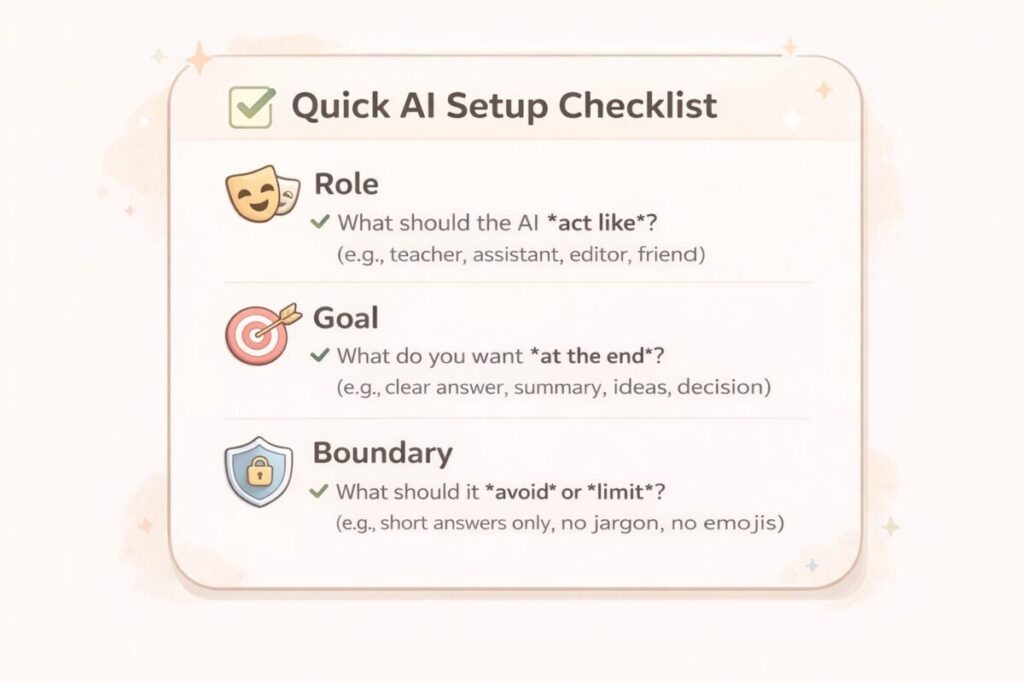
Before you type: 3 beginner rules that improve janitor ai instantly ✅
These are small habits, but they change your results a lot.
1) Say what you want, not what you hope
Instead of “help me,” say “give me 5 options,” or “make a step-by-step plan.”
2) Give a quick role
You can do it in one line:
- “Act like a strict tutor.”
- “Act like a friendly best friend.”
- “Act like a calm therapist-style coach.”
3) Add one boundary (optional but powerful) 🛡️
If you want a clean chat:
- “Keep it family-friendly.”
- “No insults, no negativity.”
- “Keep answers short and clear.”
That’s it. Now let’s jump into examples.
janitor ai examples for beginners (copy + paste prompts) 📌
Below are beginner prompts that are easy, fun, and useful. I’m writing them in a copy-paste style so you can try them immediately.
Example 1: “Friendly starter chat” (warm-up) 👋
Use this when you don’t know what to say yet.
Prompt
- “Hi! I’m new here. Please introduce yourself in a friendly way, ask me 3 simple questions, and suggest what we can do together.”
Why it works
- It creates a smooth start
- The AI guides you instead of you guessing
janitor ai roleplay examples (easy scenarios) 🎭
If you’re using janitor ai mainly for roleplay, start simple. Beginner roleplay works best when you keep the scene clear and small.
Example 2: “Coffee shop meet” (simple roleplay) ☕
Prompt
- “We meet in a quiet coffee shop. You’re calm and confident. I’m new in town. Keep it light, friendly, and realistic. Start with a short scene and one question.”
Tip
- If the AI writes too long, add: “Keep each message under 80 words.”
Example 3: “Detective mystery” (fun, not complicated) 🕵️♂️
Prompt
- “Act like a detective. Give me a mystery case with 3 suspects. Ask me questions and let me solve it. Keep it clean and story-focused.”
Why it works
- You get interactive roleplay
- You don’t need big lore or big setup
Example 4: “Fantasy guide” (gentle world-building) 🧙
Prompt
- “You are my fantasy guide in a new city. Describe the place in 5 lines. Then give me 3 choices of what I can do next. Keep it simple and vivid.”
Tip
- Choice-based roleplay is easier than freeform roleplay.

janitor ai examples for studying and learning 📚
This is the part many beginners ignore, but it’s honestly powerful. You can use janitor ai like a tutor.
Example 5: “Explain like I’m 12” (best learning prompt) 🧠
Prompt
- “Explain (topic) like I’m 12 years old. Use simple words, 1 example, and then ask me 2 quick questions to test me.”
Great topics
- grammar rules
- history concepts
- science basics
- math steps
Example 6: “Make study notes” (quick notes style) 📝
Prompt
- “Make short study notes on (topic). Use headings, bullet points, and a 5-question quiz at the end.”
Tip
- If you want exam vibe: “Make questions like an exam.”
Example 7: “Fix my writing” (beginner-friendly) ✍️
Prompt
- “Here is my paragraph: (paste). Please correct grammar, improve clarity, and keep my meaning. Then show me 5 better word choices.”
Why it works
- You learn and improve at the same time
janitor ai examples for content creators (blog, YouTube, social) 🎥
Even if you’re new, you can use janitor ai to create content faster.
Example 8: “Blog outline that doesn’t feel boring” 🧩
Prompt
- “Create a blog outline on (topic). Make it easy for beginners. Use short headings, examples, and a friendly tone. Add 10 image ideas too.”
Example 9: “YouTube script starter” 🎙️
Prompt
- “Write a YouTube script about (topic) for 6–8 minutes. Add scene suggestions, voice pauses, and simple language. Keep it respectful.”
Tip
- If you want smoother pacing: “Add a pause every 20–30 seconds.”
Example 10: “Hook generator” (fast CTR boost) ⚡
Prompt
- “Give me 15 hooks for a video about (topic). Make them short, curiosity-based, and beginner-friendly.”
janitor ai examples for daily productivity (surprisingly useful) ✅
These are the “real life” prompts. Simple, practical, and easy.
Example 11: “Daily plan in 10 minutes” 🗓️
Prompt
- “Plan my day. I have (time), (tasks), and I want (goal). Make a simple schedule with breaks. Keep it realistic.”
Example 12: “Decision helper” ⚖️
Prompt
- “Help me choose between A and B. Ask me 5 questions first. Then give a clear recommendation with pros/cons.”
Example 13: “Message rewrite” (clean and polite) 💬
Prompt
- “Rewrite this message to sound polite and professional, but still friendly: (paste). Give me 2 versions.”
The beginner mistake that ruins results (and how to fix it) 😅
The biggest mistake is writing one short line like:
- “Roleplay with me.”
That’s too open, so results become random.
Instead, give 3 things:
- setting
- tone
- what you want next
Example:
- “We are in a gym. Keep it friendly and motivational. Start with a short scene and ask me what my goal is.”
That’s it. You just improved your chat.
My opinion section (honest beginner advice) 🧠
If you’re new, don’t start with complex characters and huge story worlds. Start small. Start clear. Start fun.
I personally use janitor ai in two modes:
- Quick fun mode: simple roleplay scenes with choices
- Useful mode: rewriting, studying, and idea generation
And I always keep my prompts short and direct. Fancy prompts look cool online, but simple prompts work better for beginners. Once you feel comfortable, then you can add deeper lore, longer memory rules, and character cards.
Also, don’t chase perfection. Your first 10 chats are like learning a new app. You’re training your style.
Ratings (beginner experience) ⭐
Here’s my honest rating for beginner use:
- Ease of starting: 9/10
- Roleplay fun: 8.5/10
- Study help: 8/10
- Writing help: 8.5/10
- Consistency (depends on character): 7.5/10
- Overall for beginners: 8.6/10
Not perfect, but very enjoyable once you learn a few prompt patterns.
Quick “copy-paste” starter pack (best 5 prompts) 🎁
If you only use five prompts, use these:
- “I’m new. Ask me 3 questions and suggest what we can do.”
- “Explain (topic) like I’m 12. Give 1 example and a 2-question quiz.”
- “We meet in a coffee shop. Keep it friendly and realistic. Start with one question.”
- “Rewrite this message to sound polite and clear: (paste). Give 2 versions.”
- “Create a simple plan for my day with breaks. I have (time) and (tasks).”
FAQ (explained clearly) ❓
1) What should I type first when using janitor ai?
If you’re new, start with a friendly introduction instead of a complex prompt. Ask the character to introduce themselves, ask you a few questions, and suggest what you can do together. This removes pressure and helps the conversation flow naturally without confusion.
2) Why does janitor ai sometimes give random or weird replies?
This usually happens when the prompt is too open or unclear. Writing something like “roleplay with me” gives the AI no direction. Adding a setting, a tone, and one clear instruction—such as “ask me one question” or “give me three choices”—makes replies much more consistent.
3) How do I control the length of janitor ai responses?
You can directly tell the AI how long you want replies to be. Simple instructions like “keep replies under 80 words” or “reply in short paragraphs” work very well. This is especially useful for beginners who don’t want long, overwhelming messages.
4) Can janitor ai be used for studying or learning?
Yes, janitor ai can work like a personal tutor. You can ask it to explain topics in simple language, create short notes, or quiz you. Prompts like “explain this like I’m 12” or “make exam-style questions” are very effective for learning.
5) Is janitor ai only for roleplay?
No, roleplay is popular, but it’s not the only use. You can also use janitor ai for writing help, rewriting messages, planning your day, brainstorming ideas, and improving communication. Many beginners are surprised by how practical it can be.
6) How do I make roleplay feel more natural?
Keep the scene small and clear. Start with simple locations like a coffee shop or classroom, and avoid long backstories at first. Asking the AI to give you choices instead of open-ended replies also makes roleplay smoother and easier to follow.
7) What’s the biggest mistake beginners make with janitor ai?
The biggest mistake is overthinking prompts or copying very complex prompts from the internet. Simple, clear instructions work better. It’s more effective to write what you want in normal language than to use fancy or technical wording.
8) How long does it take to get good results with janitor ai?
Most users start getting good results after just a few chats. Once you reuse the same 5–10 prompt styles and slightly adjust them, you’ll quickly understand how to guide characters and get the tone you want.
9) Is it okay to reuse the same prompts again and again?
Yes, and it’s actually recommended. Reusing prompts helps you learn what works best. Over time, you’ll naturally tweak them to fit different characters or situations, which improves results without extra effort.
10) What’s the easiest way to improve my experience as a beginner?
Start simple, give clear instructions, and don’t rush into complex roleplay setups. Focus on enjoying the conversation first. Once you feel comfortable, you can explore deeper scenarios, longer memory setups, and more creative prompts.