
AI Christmas photo ideas are one of the fastest ways to make your holiday content look magical without hiring a designer. You can create cozy Christmas portraits, funny family cards, cute pet photos, and even cinematic winter scenes with just a prompt. Even better, you can do it in minutes. You can do it on your phone. You can do it even if you have zero editing skills.
The holiday season is busy. People want festive photos for Instagram, WhatsApp, Facebook, YouTube thumbnails, and greeting cards. However, not everyone has time for photoshoots or expensive edits. That is why AI Christmas photo ideas are exploding in popularity. With the right tools, you can generate brand-new images, enhance old photos, remove backgrounds, add Santa outfits, create snow effects, and turn regular pictures into holiday art.
In this guide, you’ll get AI Christmas photo ideas you can actually use, plus 10 powerful AI tools that make those ideas easy. You’ll also see simple tips, prompt examples, and a FAQ section at the end. Everything is beginner-friendly, fun, and easy to follow. Let’s start.
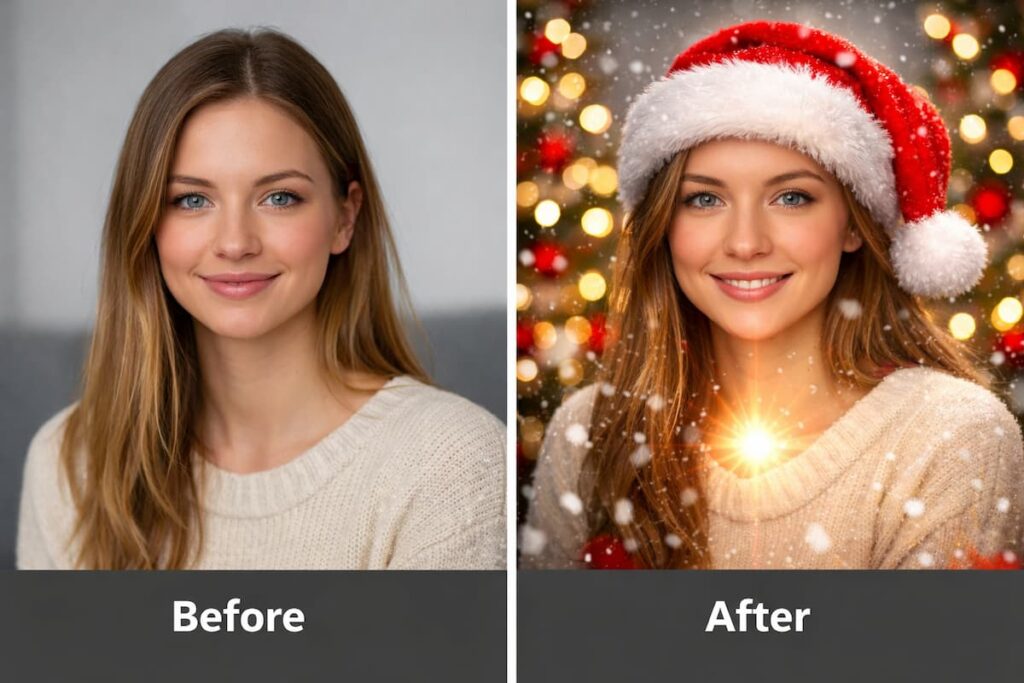
Before you start: 3 quick tips for better AI Christmas photo ideas ✅
1) Pick a clear style 🎨
Decide what you want first: realistic, cartoon, Pixar-like, vintage, watercolor, or cinematic. A clear style makes results look cleaner.
2) Use simple holiday details 🎅
Add small details like:
- snowflakes
- warm lights
- red/green color tones
- Christmas tree bokeh
- cozy sweaters
- candy canes
3) Always test 2–3 prompts 🔁
One prompt can be okay. Three prompts can be amazing. Small tweaks make big differences.
AI Christmas photo ideas: 20 fun ideas you can try today 🎁📸
Use these AI Christmas photo ideas for personal photos, couples, pets, or content creation:
- Cozy cabin portrait with fireplace glow 🔥
- Santa workshop scene with tools and toys 🧸
- Snowy street cinematic photo with warm lights 🌨️
- Ugly sweater “fashion shoot” style 😄
- Reindeer costume pet portrait 🐶🦌
- Christmas postcard with name text overlay ✉️
- Winter wonderland couple photo ❄️❤️
- Classic vintage film Christmas style 📽️
- Gingerbread house scene with cute props 🍪
- Christmas market street photography vibe 🏮
- Family cartoon Christmas card style 👨👩👧👦
- Santa hat + snowfall on your original selfie 🎅
- “Home Alone” style fun movie poster concept 🎬
- Neon Christmas cyberpunk style 🌈
- Royal Christmas portrait with elegant outfits 👑
- Cute chibi character Christmas avatar 🧑🎄
- Snow globe photo effect 🌐
- Christmas wallpaper with your name 🖼️
- Holiday product photo mockup (for sellers) 🛍️
- Christmas thumbnail for YouTube videos ▶️
Now let’s see the 10 powerful AI tools that help you create these easily.
10 powerful AI tools for AI Christmas photo ideas 🎄🤖
1) ChatGPT (Image generation + prompt help) 💬🖼️
ChatGPT is great for AI Christmas photo ideas because it can:
- generate images (if your version supports it)
- create strong prompts for other tools
- rewrite prompts for different styles
Best for: quick concept ideas + better prompts
Try prompt:
“Create a realistic Christmas portrait of a young man in a cozy red sweater, warm fairy lights, soft snowfall, shallow depth of field.”
2) Midjourney (High-quality Christmas art) 🎨
Midjourney is famous for beautiful, detailed images. It’s perfect for:
- cinematic winter scenes
- fantasy Christmas artwork
- stylized holiday posters
Best for: premium-looking visuals
Try prompt:
“Cozy Christmas living room, warm golden lights, decorated tree, snow outside window, cinematic photography, ultra realistic.”
3) Leonardo AI (Flexible styles + fast results) ⚡
Leonardo AI is beginner-friendly and gives strong control over styles. It’s good for:
- character portraits
- holiday illustrations
- Christmas-themed avatars
Best for: creators who want variety
Try prompt:
“Cute Christmas avatar, soft pastel colors, Santa hat, winter background, friendly smile, high detail.”
4) Canva AI (Holiday designs + quick templates) 📌
Canva is perfect when you want AI Christmas photo ideas turned into:
- cards
- posters
- social media posts
- thumbnails
Best for: quick designs with text
Try idea:
Generate a Christmas background, then add: “Merry Christmas from [Name] 🎄”
5) Adobe Firefly (Safe, clean style visuals) ✨
Firefly works well for:
- clean holiday graphics
- background generation
- decorative elements like snow overlays
Best for: clean and professional holiday visuals
Try prompt:
“Christmas bokeh lights background, warm gold and red tones, soft blur, high resolution.”
6) Bing Image Creator (Fast and easy) ⚡🖼️
If you want quick AI Christmas photo ideas without setup, this is an easy choice.
Best for: fast concept images
Try prompt:
“Christmas family photo in a cozy living room, warm lighting, decorated tree, realistic style.”
7) PicsArt AI (Fun edits + holiday effects) 😄
PicsArt is great for quick holiday edits like:
- adding Santa hats
- snow effects
- stickers and frames
- festive filters
Best for: phone edits and social content
Try idea:
Take a selfie and add snowfall + Christmas border + “Happy Holidays” text.
8) Remini (Enhance old photos for Christmas cards) 🧼✨
Remini is perfect if you want to improve quality before you add holiday effects.
Best for: sharpening blurry photos
Try workflow:
Enhance photo → remove noise → then add Christmas overlay in Canva/PicsArt.
9) Remove.bg (Clean background removal) ✂️
Background removal is a hidden trick for AI Christmas photo ideas. Once your background is clean, you can place yourself into any festive scene.
Best for: Christmas card cutouts
Try workflow:
Remove background → add winter scene background → add lights and text.
10) CapCut (Photo-to-video Christmas content) 🎬
CapCut helps you turn AI Christmas photo ideas into:
- short reels
- slideshow videos
- animated Christmas greetings
Best for: Instagram reels and TikTok
Try idea:
Use 6 AI Christmas images → add snow overlay → add holiday music → export video.
Easy step-by-step: create a Christmas photo in 10 minutes ⏱️🎄
Step 1: Choose one idea
Pick one from the list (cozy portrait, winter street, pet reindeer).
Step 2: Choose your tool
- Generate: Midjourney / Leonardo / Bing
- Design: Canva
- Edit: PicsArt / CapCut
- Enhance: Remini
Step 3: Use a simple prompt
Keep it short, clear, and specific.
Step 4: Improve with small changes
Change one thing at a time:
- “warm lighting”
- “soft snowfall”
- “cinematic photography”
- “Christmas tree bokeh”
Step 5: Add finishing touches
- add text
- add border
- add stickers
- export in high resolution
This workflow makes AI Christmas photo ideas easy even for beginners.
Prompt pack: copy-paste AI Christmas photo ideas 🎁🧠
Use these AI Christmas photo ideas prompts:
- “Realistic Christmas portrait, warm lights, red sweater, snow outside window, soft glow.”
- “Cute pet wearing reindeer costume, Christmas tree background, high detail, soft lighting.”
- “Cinematic snowy street at night, holiday lights, people walking, cozy vibe, realistic photo.”
- “Vintage Christmas postcard style, warm film grain, classic holiday colors, cheerful mood.”
- “Minimal Christmas background, red and gold bokeh, clean design, high resolution.”
Best uses for AI Christmas photo ideas (content + personal) ✅
For personal use
- Christmas greeting cards
- WhatsApp DP and Instagram posts
- Family photo upgrades
- Cute pet holiday photos
For creators
- YouTube thumbnails
- Instagram reels and cover images
- Blog feature images
- Holiday ads and product mockups
AI Christmas photo ideas work for fun and for content marketing, which is why so many people love them.
Mistakes to avoid 🚫
- Using too many details in one prompt
- Adding copyrighted characters (can get blocked)
- Ignoring lighting (lighting makes photos look real)
- Forgetting to export in high resolution
- Over-editing faces until they look unnatural
Keep it simple, keep it clean, and test a few variations.
FAQ: AI Christmas photo ideas ❓
1) Are AI Christmas photo ideas safe to use for personal and social media posts?
Yes, AI Christmas photo ideas are generally safe for personal use and social media sharing. You can post them on Instagram, WhatsApp, Facebook, or use them as profile pictures and greeting cards. However, it’s a good idea to avoid copying famous characters or brand logos exactly. Keeping your images original helps you stay safe and stress-free.
2) Do I need design or editing skills to create AI Christmas photos?
No, you don’t need any design skills at all. Most AI tools are built for beginners and work with simple text prompts. You just describe what you want, and the tool does the hard work. Over time, you’ll naturally get better by trying small changes in prompts, but even first-time users can create good results.
3) Which AI tool is best for beginners creating Christmas photos?
For beginners, tools like Canva AI, Bing Image Creator, and PicsArt are the easiest to start with. They have simple interfaces and ready-made holiday elements. If you want more artistic or realistic images later, you can explore tools like Midjourney or Leonardo AI.
4) How can I make AI Christmas photos look more realistic?
To make your images look real, focus on lighting and simplicity. Use words like “warm lighting,” “soft glow,” and “natural skin tones” in prompts. Avoid adding too many effects at once. Small details like snow outside a window or blurred Christmas lights often make photos feel more natural.
5) Can I use AI Christmas photo ideas for business or content creation?
Yes, many creators use AI Christmas photo ideas for YouTube thumbnails, blog images, ads, and social posts. Just make sure the images are original and not copied from copyrighted characters. These photos are great for seasonal content, promotions, and festive branding.